


Sometimes. But for most homes, routing by device is cleaner, easier to manage, and more reliable than trying to force only one website through a VPN.

Updated June 2026: This guide has been refreshed to remove retired FlashRouters Privacy App references, correct outdated dual-router-first framing, and point readers to current FlashRouters VPN setup options.
A common VPN router question is simple: can you send some websites through a VPN while other websites use your regular internet connection?
The honest answer is: sometimes, depending on your router firmware, VPN configuration, and how the website works. But the better answer for most users is this: instead of routing by website, route by device.
Modern recommendation: Use device-based selective routing whenever possible. It is usually easier to understand, easier to support, and less likely to break than domain-based website routing.
Why “VPN for one website only” is harder than it sounds
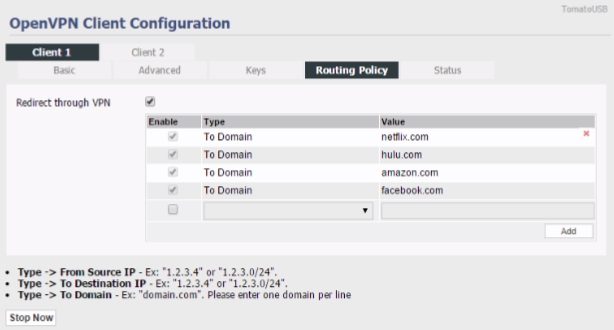
On paper, website routing sounds easy. You might want Netflix through a VPN, your bank outside the VPN, and your work tools on a regular ISP connection. The problem is that modern websites are rarely just one clean domain.
A single site may use multiple domains, content delivery networks, login services, payment processors, advertising systems, tracking tools, app APIs, and location checks. That makes website-only VPN routing fragile. One rule may work today and fail later if the website changes how it loads content or verifies location.
The better approach: route devices instead of websites
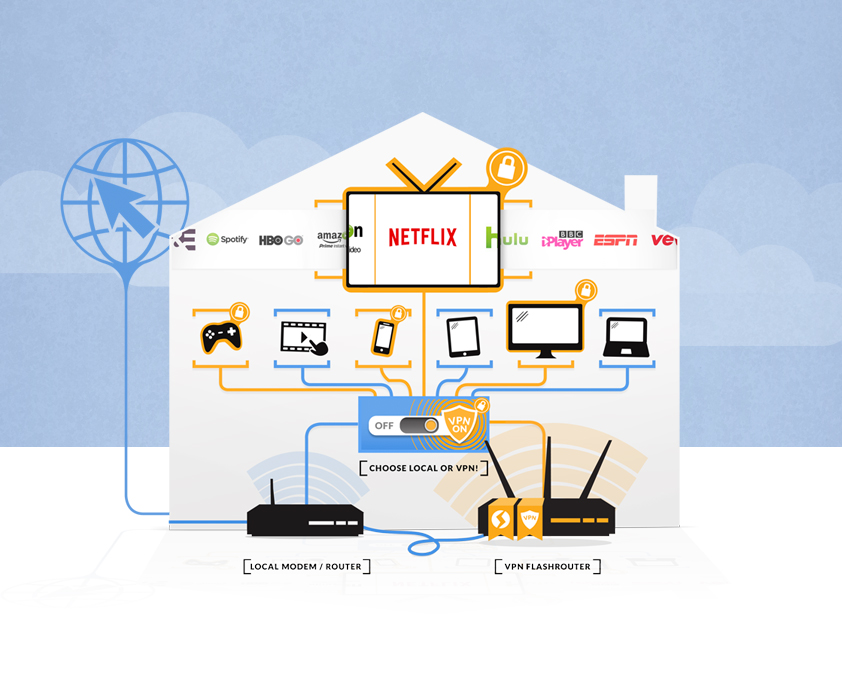
Device-based routing is usually more practical. Instead of trying to route only a domain, you decide whether a specific device should use the VPN or stay on your normal internet connection.
Send your smart TV, Roku, Fire TV, Apple TV, or streaming box through the VPN while other devices stay local.
If your employer, bank, or school dislikes VPN IP addresses, keep that laptop or tablet off the VPN route.
Put some devices on VPN for privacy and others on regular ISP routing for compatibility or speed.
Website routing vs device routing vs dual-router setup
| Setup Type | How It Works | Best For | Watch Out For |
|---|---|---|---|
| Website or Domain Routing | Advanced rules attempt to send specific domains through VPN or outside VPN. | Technical users with a narrow, controlled use case. | Modern websites use many domains and services, so rules can become unreliable. |
| Device-Based Selective Routing | The router decides VPN or local routing by device. | Most homes, streaming devices, work laptops, gaming consoles, and mixed-use networks. | You need a router platform that supports the routing style you want. |
| Dual-Router Setup | One router or network uses regular internet while another router or network uses VPN. | Users who want two separate Wi-Fi networks: VPN and non-VPN. | More hardware, more wiring, and more network complexity than many users need. |
When website-specific VPN rules can still make sense
Website-specific VPN routing can still be useful for advanced users, especially when the site or service has predictable domains and the router firmware gives you enough control. This is more of a power-user configuration than a general household recommendation.
- You know exactly which domains need to use or bypass VPN.
- You are comfortable testing and maintaining routing rules.
- The website does not rely heavily on changing third-party services.
- Your router firmware supports the type of policy rules you need.
- You understand that rules may need to be updated over time.
Examples of smart selective routing
Which FlashRouters setup should you choose?
Start with the outcome you want, not the firmware name. A DD-WRT setup may be right for advanced users who specifically want DD-WRT controls. A modern Asus or GL.iNet option may be better for Wi-Fi 7 performance, provider flexibility, or OpenWrt-based tuning. Privacy Hero 2 is the simpler path for users who want easier whole-home NordVPN routing without deep manual configuration.
| User Goal | Recommended Starting Point | Why |
|---|---|---|
| Easiest NordVPN router setup | Privacy Hero 2 for NordVPN | Built for simplified whole-home NordVPN use and cloud-managed router controls. |
| Best all-around VPN router comparison | Best VPN Routers 2026 | Compares use cases like performance, value, travel, mesh, and power-user control. |
| Advanced firmware learning | Open Source Router Firmware | Explains OpenWrt, DD-WRT, and other firmware paths for deeper control. |
| Budget DD-WRT route | Linksys MR7350 DD-WRT FlashRouter | A DD-WRT-focused option for users who specifically want that firmware route. |
Not sure which routing style you need?
Answer a few questions about your VPN provider, devices, streaming needs, and home layout. We’ll point you toward the best router path.
Recommended next reads
VPN for specific websites FAQ
Can I route only one website through a VPN on a router?
In some advanced router setups, yes. But it depends on the router firmware, VPN configuration, and how the website’s domains are structured. Many modern sites use multiple domains and services, so website-only routing can be unreliable.
What is the easier alternative?
Device-based selective routing is usually easier. You choose whether a device uses VPN or local internet instead of trying to maintain rules for every website domain.
Do I still need a dual-router setup?
Not always. A dual-router setup is still useful if you want two separate Wi-Fi networks, but many users can now solve the same basic problem with selective routing by device.
Why do some websites not work well with VPN?
Banks, streaming platforms, work portals, and fraud-prevention systems may block or challenge VPN IP addresses. If a site is sensitive to location or security signals, routing that device outside the VPN may be the cleaner fix.
Which router should I buy for selective VPN routing?
It depends on your VPN provider, devices, home size, and comfort level. Use the FlashRouters Router Quiz or compare the Best VPN Routers 2026 guide to narrow the options.


BEST VPNs OF 2026
#1

#2

#3
